

Multilingual Keyboards - Typing in Foreign Languages
What is a Multilingual Keyboard?
A keyboard where you can type in more than one language is commonly referred to as a multilingual keyboard. If you are working with translation software you will probably need to type in a foreign language.
With our software you will want to create a customized dictionary and/or proof the foreign language documents after translation. It will help to have your keyboard set up to input letters that have foreign language accents or Asian characters.
You can buy keyboards that are specific to a language, for example a French keyboard, but if you work with multiple languages, you can easily convert yours into a multilingual keyboard so it handles more than one language.
First, let's learn about the different types of keyboards that are sold with computers worldwide.
Three Common Types of Keyboard Layouts
If you walk into a computer store in another country you might notice the keyboard that comes with the computer is different. There are three types of keyboard layouts used around the world.
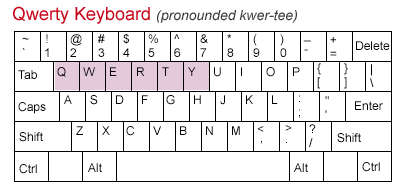
1. Qwerty: (pronounced kwer-tee)
The Qwerty keyboard is the most common in the United States and is named after the five letter keys located on the top left side. This keyboard was originally designed by Christopher Sholes, the inventor of the typewriter.
2. Azerty Keyboard:
The Azerty keyboard is the French version of the standard Qwerty Keyboard. You will see this version in France and Belgium. The arrangement is designed to increase typing speeds over the original Qwerty.
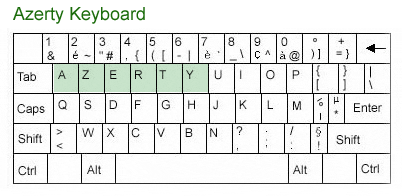
3. Qwertz Keyboard:
The Qwertz Keyboard is found in Central Europe and Germany. If you look closely at the keyboard you will see the "Y" and "Z" are swapped. This keyboard in Germany is also designed to include the special accents over the letters.
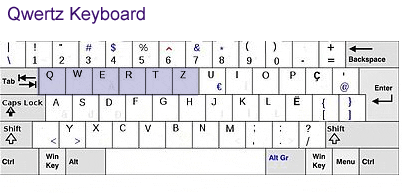
European Language Keyboards
There are many languages that use accent marks above the letters to change the inflection or the meaning of a word. You can type these accent marks on your keyboard a couple of different ways. Sometimes this means only a few keys are modified from the layouts above.
You can add a foreign language keyboard by adding an additional input method. For step by step instructions on how to add a keyboard with these accents in Microsoft Windows, click here.
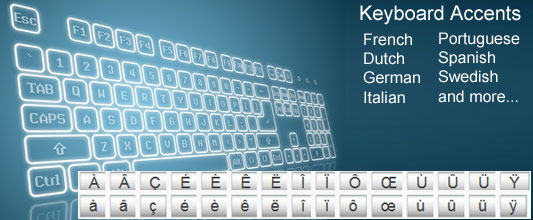
Asian Language Keyboards
Chinese
The Chinese language has over 50,000 characters. Can you imagine the English language having this many letters? Even though there are that many Chinese characters, those that are fluent in Chinese only need to know about 3,000 to 4,000 of the most commonly used characters.
How do you type all those characters on a keyboard? Computers are already designed to be multilingual. If you go into the Windows Regional and Language Settings of your computer's control panel, and add another keyboard, it will assign a different character to the letters typed in. This is called an "input method". For Chinese they use a combination of romanized letters to create Chinese characters, this is called Pinyin. For Chinese speakers, Pinyin is taught to all students at a very young age.
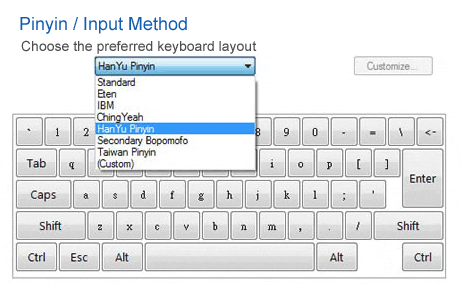
The standard Qwerty keyboard is used to write Chinese characters. Once you add Pinyin as an input method, the typist can generate the Chinese characters by using a combination of keys to create a specific character.
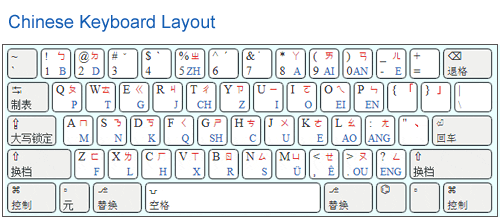
Japanese
The Japanese language is like the Chinese, there are lots of characters. In fact if you research you will find no one really agrees on exactly how many characters there are but it can be over 50,000. Plus add to the confusion (for non -Japanese speakers) the fact they have different types of characters. They can use Romaji, Hiragana, Kanji and Katana.
The standard Qwerty keyboard is once again used to write the Japanese characters just like the Chinese, you can add a keyboard and change the input method in Windows.
To type Japanese you normally type in Romaji first, and the keyboard can automatically convert it into the Hiragana characters . Note, Katana is not supported by the software without an additional modification.
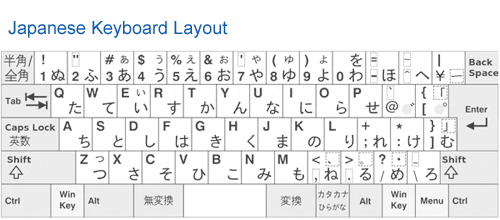
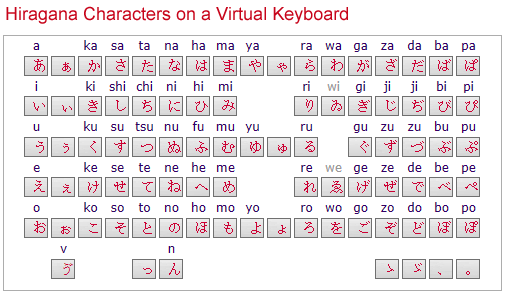
Keyboard Labels Can Make It Easier
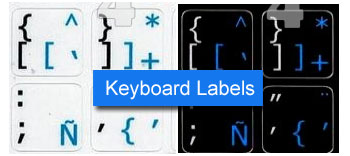
After you change the input method and added the keyboard, you need labels / stickers that can be applied to the keyboard to make it easy to see which keys to use in the foreign language. There are a variety of different type of stickers, they can be transparent and removable and not harm the keys. When purchasing the labels, you will need to identify the keyboard layout. Use the images above to determine if you are using a Qwerty or other type of layout.