
SYSTRAN Professional Translator
SYSTRAN Professional Translator is a more professional package and can deliver higher accuracy automatically due to additional dictionaries and powerful features. The Professional version is packed with professional tools that are unparalleled in industry. These translation tools allow you to train the software both manually and automatically to achieve higher accuracy.
Languages Available:
English to/from: Spanish, French, German, Greek, Italian, Portuguese, Swedish, Polish, Dutch, Russian, Japanese, Korean, Chinese, Arabic, Albanian, Bulgarian, Czech, Farsi, Ukrainian, Urdu and more!
NOW ON SALE: $299.00
Additional Language Pairs: $69.00 each

Also See: SYSTRAN Essentials Translator
Translate Full Documents with one Click
Microsoft Office – Word, Excel, PowerPoint, and Outlook
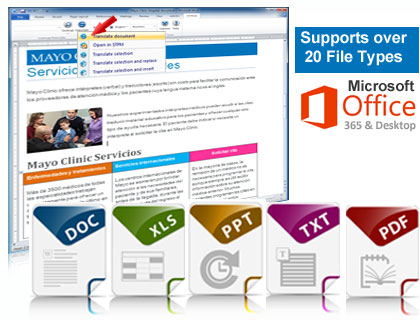
Instantly convert full documents in Word, Excel, Powerpoint, Outlook, and PDF with translation software. Best of all, it's designed to retain your original formatting.
Systran automatically integrates into Microsoft Office making it easy to translate documents without having to learn new software.
Supports Additional File Formats
HTML, XML, RTF, TXT, XLIFF and OpenOffice documents (ODT, ODS, ODP)
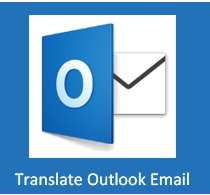
Keep the Document's Formatting
SYSTRAN's translator is designed to keep the document's formatting after it has been translated. The software creates a brand new document in the new language so it does not overwrite your original. Some restrictions can apply but the results are incredible.
Translate Word, Excel, Powerpoint, Outlook and Email.

Learn more, Click Play to watch the video
Translate Outlook Emails
SYSTRAN integrates into Microsoft Outlook and can securely translate your incoming and outgoing email. The software retains the message in the original language and provides the translation in the same message thread. This allows everyone to see the original and the translation.
Translate the full message or only a section, you have full control.
Translate PDF files
PDF files are the most popular format used in the business world today. With Systran you can translate your PDF files and retain the formatting on many of your documents. Files will be converted to RTF (Rich Text Format) for easy viewing in Microsoft Word, then easily convert back to PDF..
PDF languge converter features includes localized dictionaries that not only process the text recognition but also compare the recognized text with localized indexes to guarantee the best results.
New: Translate either editable or non-editable PDF files. No need to purchase an additional OCR software. Learn more about translating PDF files.
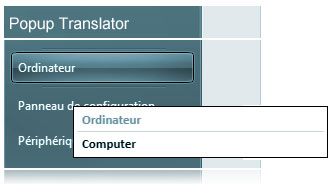
Omni Popup Translation Tool
Hover over any text in and a small popup window will allow you to view the text in the source (orignial language) and target (translated language)
Perfect for understanding menus or any text you need to understand in another application.
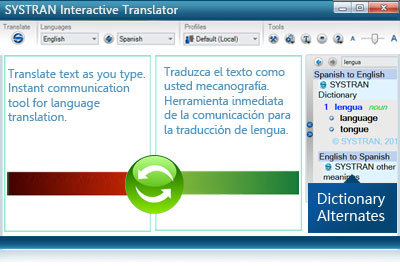
SYSTRAN Interactive Translator
This handy tool allows you to translate in real time. Excellent for conversing with someone that speaks another language. Because you are using text, it can be more accurate than a speech translator.
Quickly get direct access to the dictionaries for instant display of Alternative Meanings. Put your mouser over any word and on the right you will see the alternative translations for that word.
Includes 21 Additional Technical Dictionaries for Higher Accuracy
SYSTRAN's Main translation dictionaries are packed with millions of words, phrases, and expressions as well as thousands of alternative meanings.
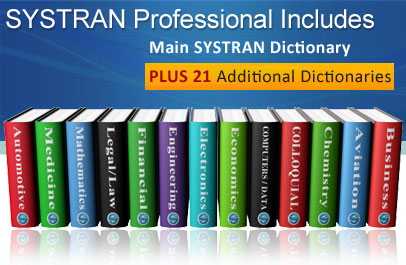
SYSTRAN Professional includes 21 Additional Technical Dictionaries
In addition to the main dictionaries, the Professional version includes 21 additional dictionaries that contains millions of technical terms and phrases grouped into 5 main categories:
- SYSTRAN Business (Economics/Business, Legal, Political Science)
- SYSTRAN Industries (Automotive, Aviation/Space, Military Science, Naval/Maritime, Metallurgy)
- SYSTRAN Life Sciences (Life Sciences, Earth Sciences, Medicine, Food Science)
- SYSTRAN Sciences (Computers/Data Processing, Electronics, Mathematics,
Mechanical/Engineering, Photography/Optics, Physics/Atomic Energy, Chemistry) - SYSTRAN Colloquial
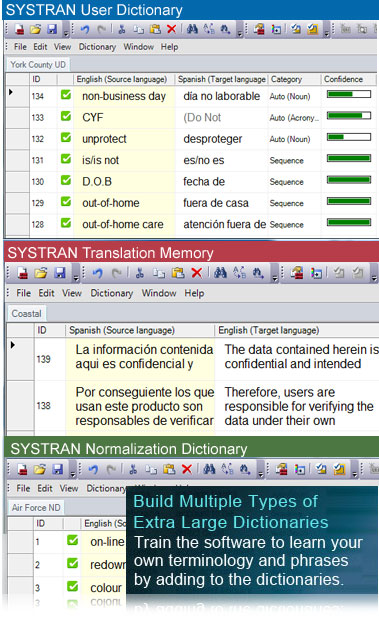
Build Your Own Custom Dictionaries
Creating your own custom dictionaries with your own terms and phrases will instantly customize the software to understand your specific terminology. Even if you're not bilingual, you can often build a dictionary that will improve the accuracy.
 User Dictionary
- Build large dictionaries of terms and phrases
- Easily mark specific words as DNT (Do Not Translate)
- Create up to 10 Dictionaries with 20,000 entries per language pair
- Automatically Extract a list of terms that need to be added to a dictionary
- Intuitive Coding™ technology automatically analyzes, codes and enriches dictionary entries with linguistic information to improve translation quality
 Translation Memory
Translation memory is a powerful translation dictionary that stores full translated sentences that can be reused with 100% translation accuracy.
- Create up to 10 dictionaries with 40,000 entries per language pair
- Supports industry standard TMX file format for easy import or export
- Excellent for any type of repetitive text (example, forms, training materials)
 Normalization Dictionary
- Excellent for Acronyms and Abbreviations
- Normalize Text for Consistency (color vs colour spelling)
Translate Foreign Language Websites
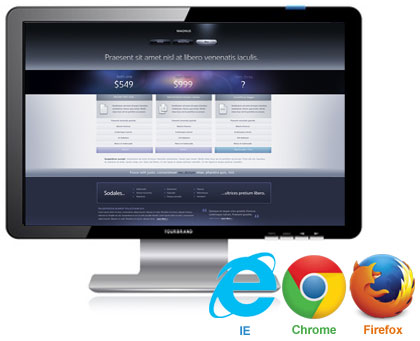
SYSTRAN plugs directly into your favorite browser so you can easily read foreign language websites. Just navigate to the site and click the translate button once, every page is then translated as you visit additional pages.
Full support for Internet Explorer, Firefox and Google Chrome
Batch Translation
Work on multiple files at one time in your corpus (collection of up to 100 files at a time).
Import, PDF, Excel, Word, Text, HTML, XML and in one click translate everything at once and easily export the translated documents.
Translate Anytime Anywhere without the Internet
Translate wherever you are, whenever you need to. You do not need an internet connection, translate offline. Increased security and mobility.
Once installed on your computer, the translation software is completely independent.

| SYSTEM REQUIREMENTS | |
|---|---|
| CPU | Minimum Intel Celeron N2840 2.5 GHz or equivalent. Recommended Intel® Core 3.3 GHz or equivalent |
| Operating System |  Microsoft® Windows
7, 8, or 10 (32 or 64-bit) Microsoft® Windows
7, 8, or 10 (32 or 64-bit) |
| Memory | • With 1 language pair: Minimum 1 GB RAM, recommended 2GB (and 500 MB per additional language pair) • With several language pairs: minimum 2 GB and 500 MB per additional language pair |
| Microsoft Office | Microsoft® Office® (32 bit) 2007, 2010, 2013, 2016 or an Office 365 Subscription |
| Hard Drive Space | 4 GB for 1 language pair |
| Web Browser | Microsoft® Internet Explorer® 11, Firefox® or Chrome |
| Note: | Performance and speed will be enhanced if your computer's processor, memory and available disk space exceed minimum requirements. |
