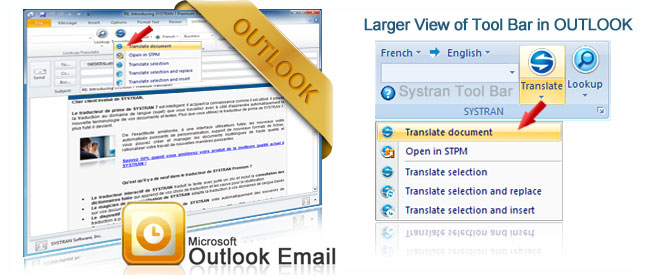
Instantly Translate E-mails
Working in a multinational company can be a bit difficult when it comes to communicating with foreign employees and clients. There is a lot of e-mail exchange and learning five or six different languages is almost impossible. Then again, you can hire a translator but this can turn out to be very expensive and can delay urgent communication.
When dealing with urgent emails that need an immediate response, you have no time to waste. You need a translator that can help you there and then. With Systran’s Translator software you get your own translator right in your Outlook that is very easy to use and is available 24/7. No exceptions, no delays.
Very Easy to Use!
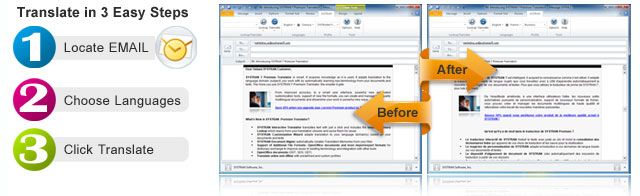

Outlook E-mail Translator Features:
- Receive emails from clients or employees written in foreign languages and understand the message in seconds.
- Write emails and instantly translate them into a foreign language before sending.
- Retain your original letter before translation for easy reference for both you and your recipient.
Plus Additional Powerful Features
- Instant Review Tools
Select a section of your email and instantly have the text appear in the interactive translator to see alternative meanings for words.
- Retains Original for Easy Reference
Software will not be as accurate as a human translator so SYSTRAN is designed to keep your original e-mail thread and the translated text to make it easy to refer back to the original whenever you need to.
- Automatic Banner: SYSTRAN adds a divider between the original and the translation letting the recipient know that software was used.
- Formatting: Plain Text or HMTL Formatting is retained!

How to Translate Email from other Providers
Easy Options to Choose from:
- Open your E-mail or write a new message, highlight your text, click "translate" and the text is converted from one language into another with just one click.
- Use the SYSTRAN Interactive Translator -
Write an email and see it translate as you type. When you are finished, just copy and paste into your email program.
Products that Translate Outlook Email:
Professional Version


Enterprise Editions